

The confidence check
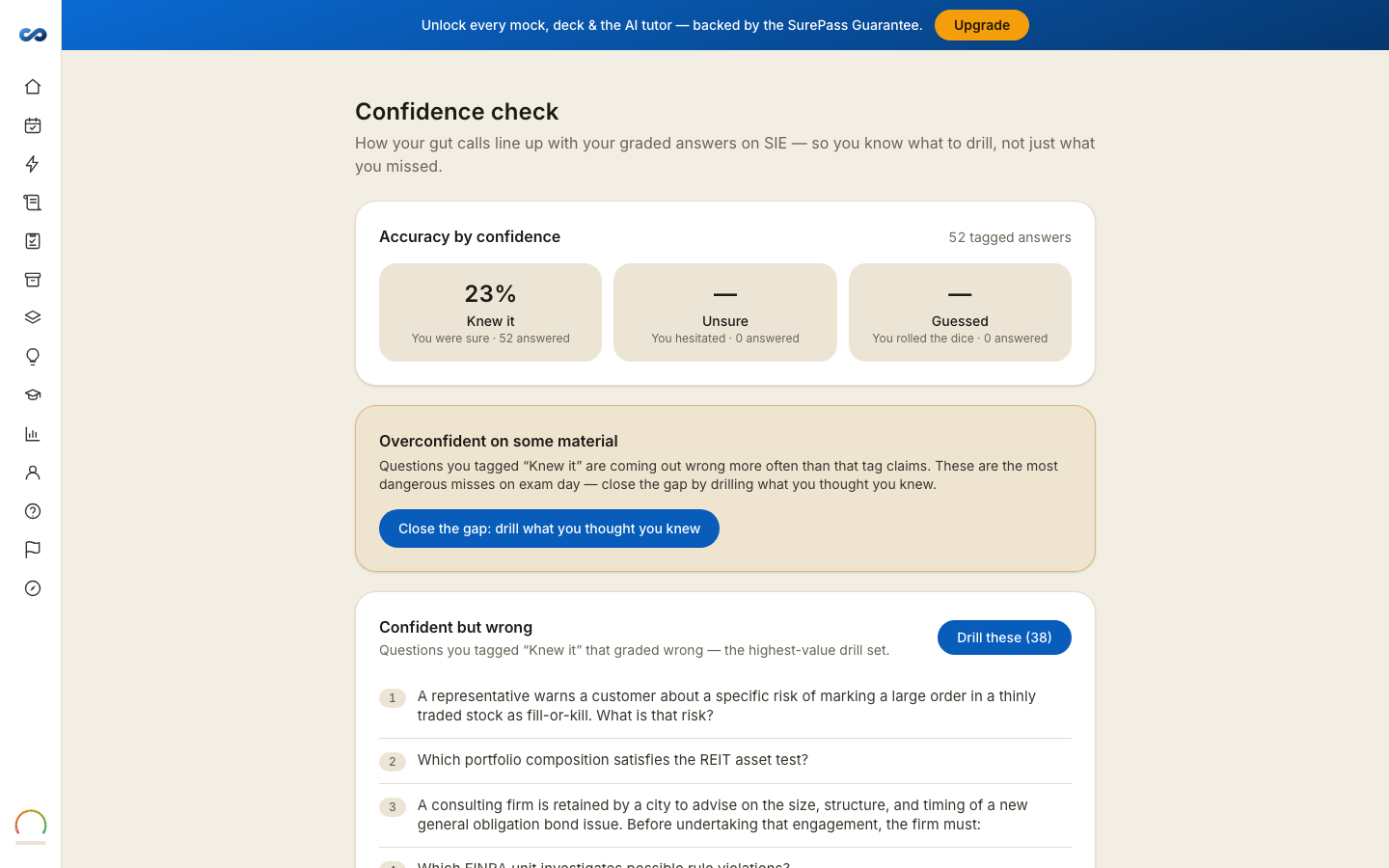
While you practice, each question offers How sure are you? — one tap: Guessed, Unsure, or Knew it. It is optional, it takes a second, and it never affects your grade, your timer or your points.
Do it for a couple of sessions and this page becomes the most useful one you have.
What it shows
Accuracy by confidence — how often you were right when you said you knew it, when you hesitated, and when you guessed. Then a verdict:
- Well calibrated — your tags match your results. Keep tagging.
- Overconfident on some material — questions you tagged "Knew it" are coming out wrong more often than that tag claims.
- Better than you think — your guesses keep landing. Trust your first instinct a little more.
- Not enough tags yet — it needs roughly fifteen tagged answers before it will say anything.
Confident but wrong
The most valuable list in the product: questions you tagged "Knew it" that graded wrong. Those are the misses that hurt on exam day, because you will not slow down for them — you do not know you are wrong.
There is a Drill these button on it. If the list is empty the page says so, and that is exactly where you want it to stay.
It never touches your readiness
This page targets what to study. It makes no claim about your chance of passing and it does not adjust your readiness meter. The meter reads your graded answers; this reads your judgment about them.
More in Practice, mocks and your plan
Didn’t answer it?
hello@capitalprep.com · we aim to reply within a few hours.