

Citations, and how many questions you get
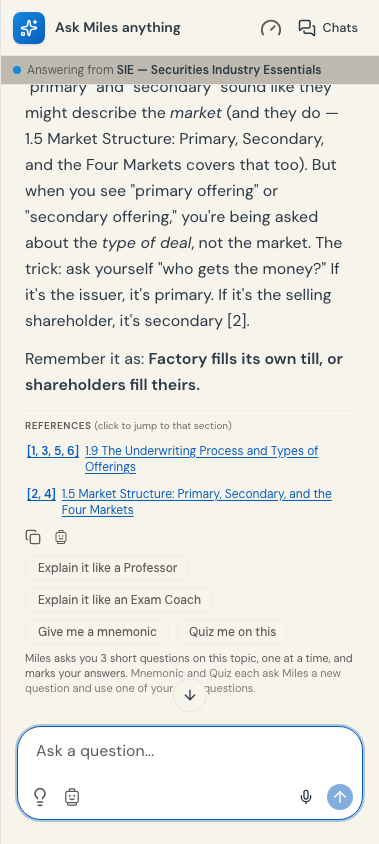
Every answer shows its sources
Under every answer is a References list: one entry per section of your study guide the answer drew on, by its title. A section named inside a sentence is plain text — the links are all in that list, so the answer reads cleanly.
Tap a reference and the guide jumps to that passage — the same page if it is in the chapter you are reading, otherwise straight to the right chapter and section. On a phone the chat tucks away so you can read, then comes back where you left it.
If you want to check something, that is how: the citation is the book, not a summary of the book.
How many questions you get
- On the 24-hour trial: 50 messages a day.
- With SurePass: 50 messages a day. Ask Miles comes with SurePass.
Both are daily allowances on a rolling day — there is no lifetime total, and tomorrow you have the full amount again. Tap the gauge in the panel header to see how many of today's messages you have used and when they reset, and when you reach the limit a strip tells you when it resets.
What spends one: asking a question, tapping Try it out or a popular question, and using Give me a mnemonic or Quiz me on this under an answer. What does not: reading, searching, the study guide itself, opening old chats, and rewriting an answer in another tone — that is a rewrite of the same answer, not a new question. (Rewrites are free up to a generous daily allowance; past it, a rewrite counts as a question.)
Two devices at a time
Miles can be open on two devices at a time. A device you have used before is always let back in; a third new one is asked to wait. Close the study guide on one of the others — an idle device frees its place on its own, which can take around half an hour. Nothing else in the app is affected.
More in Ask Miles
Didn’t answer it?
hello@capitalprep.com · we aim to reply within a few hours.